Your Next Franchise Buyer Could Come From AI Search.
We find the most important and relevant search prompts and help your brand gain top rankings. Beat your competitors—and measure the results, from lead to location.

AI Search Is Already Producing Franchise Deals.
Franchise buyers are arriving from AI assistants—and some are becoming closed business. See how the Insights Engine measures this emerging channel, from website activity to CRM progression and won deals.
Establish Your AI Search Baseline.
See measurable AI-referred sessions and website goals by assistant, including ChatGPT, Gemini, Claude and Copilot. The Insights Engine brings the source breakdown, traffic trend and conversion activity together so you can monitor this channel over time.
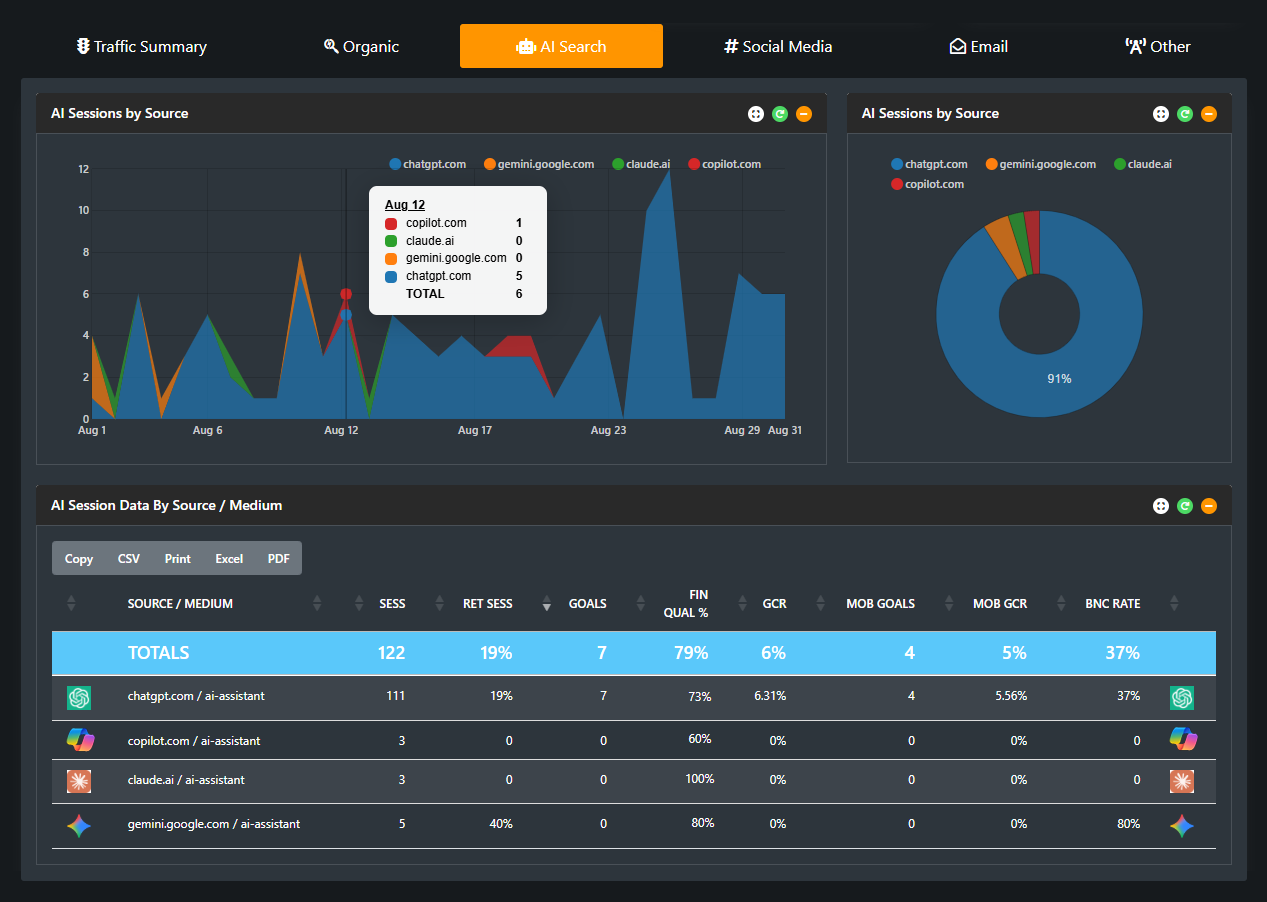
This August 2026 example shows 122 AI-referred sessions and 7 website goals. Website goals and CRM leads are separate measurements.
Follow AI Leads Into Your CRM.
Traffic is the starting point. CRM Connect follows identified AI-sourced leads into bookings, kept appointments and applications, giving your team visibility into candidate progression alongside every other source.
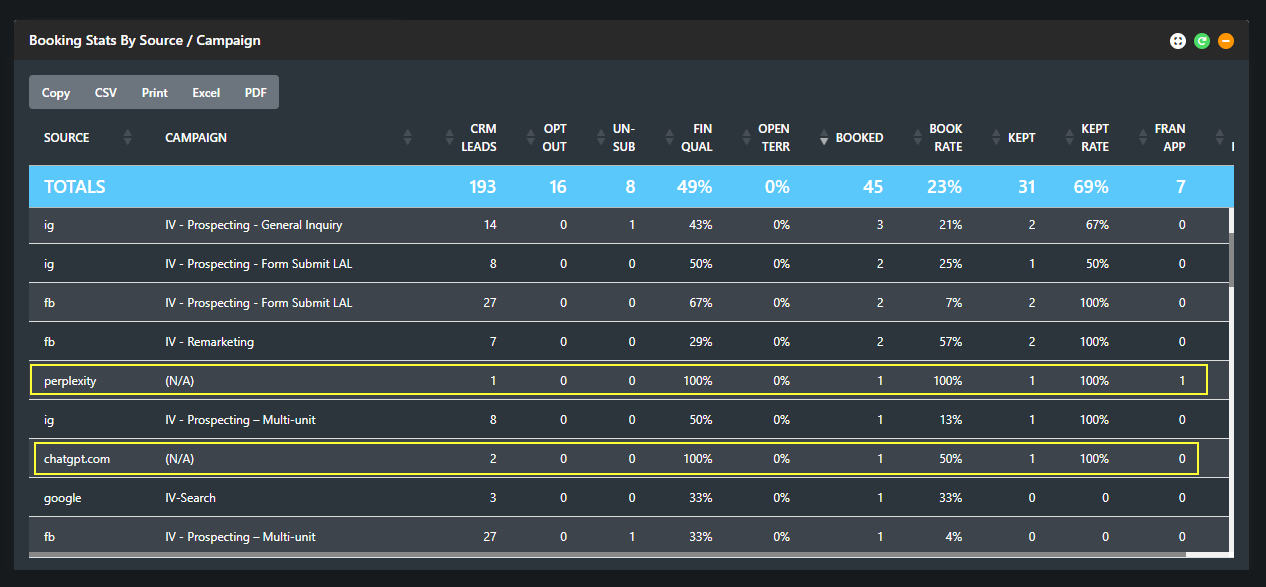
AI-sourced leads are progressing into booked appointments, kept appointments and a franchise application. The totals row includes all channels.
See the Business AI Search Is Producing.
AI Search is already contributing closed business. The Unit Sales Module connects recorded source attribution to won deals and revenue, making the commercial opportunity visible alongside your other acquisition channels.
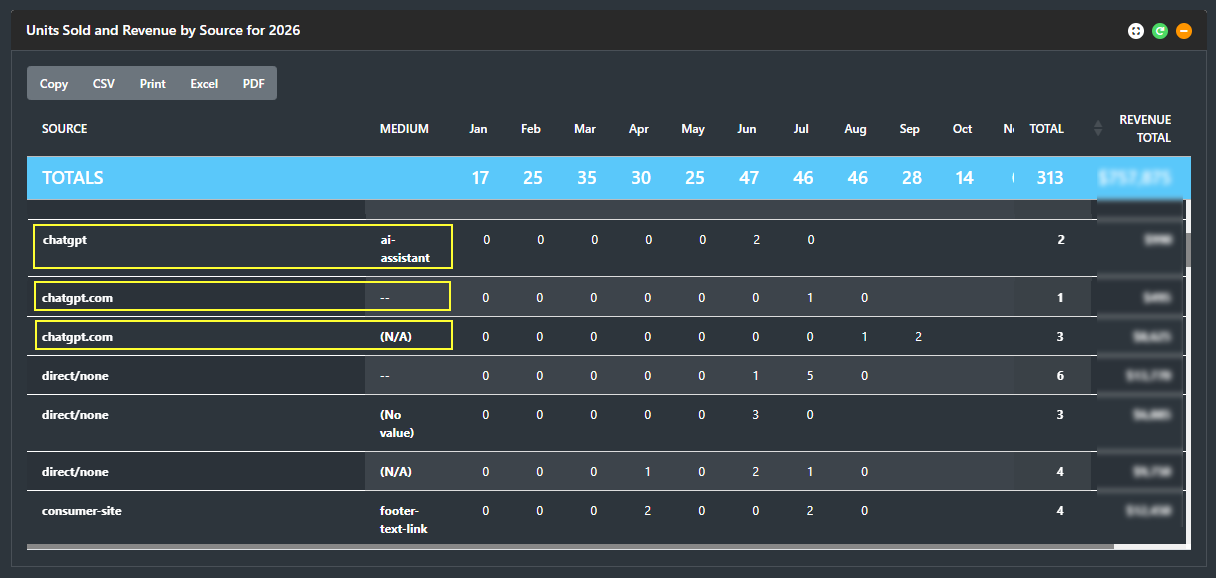
Since January 1, 2026, AI Search has produced 6 closed franchise deals in this example. These views illustrate separate measurement layers and should not be read as one matched cohort.
Know Where You Stand.
Establish current AI-referred traffic and lead activity before changes begin.
Compete for the Next Buyer.
Use AI Search Intelligence to identify visibility gaps and strengthen the evidence buyers—and AI assistants—find.
Connect Visibility to Business.
Monitor AI referrals, candidate progression and won business as your strategy develops.
Build the strategy. Measure the channel. Our AI Search program helps your brand improve its visibility. Our platform shows the measurable traffic and business arriving from it.
Get Found. Compete. Measure the Results.
Our AI Search Intelligence program identifies the search prompts that matter to your franchise buyers, shows where competitors are winning visibility and creates a plan to strengthen your brand’s position. We guide website and authority improvements, then retest to measure what changed—with the Insights Engine tracking measurable AI activity from lead to location.
01Find the Prompts and Competitors That Matter
We establish your approved brand facts and test branded Core questions alongside unbranded Discovery prompts relevant to your opportunity. The six analytical modules evaluate canonical truth, source readiness, discovery visibility, competitive overlap, demand opportunity, and the actions required to improve and retest your position.
02Establish Your AI Search Baseline
We review current AI-referred website activity and run three controlled live scans when possible before major changes. This establishes how AI assistants describe your brand, whether they recommend it and which competitors appear alongside—or instead of—you.
03Turn the Findings Into Website Improvements
Your brand and web team receive a specific action plan showing where to add an article, create a page or strengthen an existing page module. Recommendations address content, metadata, schema, internal links and supporting evidence so AI assistants can find and substantiate your opportunity’s strengths.
04Strengthen the Sources AI Uses
We identify important external listings and source inconsistencies that may affect how AI retrieves and describes your brand. The plan prioritizes corrections your team can control or request, helping align third-party information with approved brand facts.
05Check Readiness Before Launch
We rescore the revised site before launch and confirm that priority facts, supporting evidence and source paths are present and retrievable. Remaining gaps become a focused final-edit list.
06Retest Your Visibility After Launch
We repeat the controlled prompt set in three post-launch pulls to measure mentions, recommendations, Top 3 placement and first-party citations. Repeated checks show whether visibility is stable, what changes and which competitors continue to appear.
07See What Changed—and What Comes Next
We compare the baseline with post-launch results, document gains and remaining gaps, and identify the next priorities. Alongside these scans, the Insights Engine monitors measurable AI referrals and, where connected, CRM progression and won business.
of Dashboard Access
Establish your traffic baseline and monitor measurable AI-referred website activity throughout the program. CRM and Unit Sales reporting connect candidate progression and won business where those data connections are in place.
Get Found. Get Ahead.
Your Next Franchise Buyer
Could Find You in AI Search.
- Find the prompts your ideal buyers use.
- See your competitors and where you stand.
- Get a clear plan to improve AI visibility.
- Track progress from visibility to won deals.
- Includes the Engine for 90 days.
"(Required)" indicates required fields